The best way to learn how to program is to do something useful, so this introduction to Python is built around a common scientific task: data analysis.
Arthritis Inflammation
We are studying inflammation in patients who have been given a new treatment for arthritis.
There are 60 patients, who had their inflammation levels recorded for 40 days. We want to analyze these recordings to study the effect of the new arthritis treatment.
To see how the treatment is affecting the patients in general, we would like to:
- Calculate the average inflammation per day across all patients.
- Plot the result to discuss and share with colleagues.
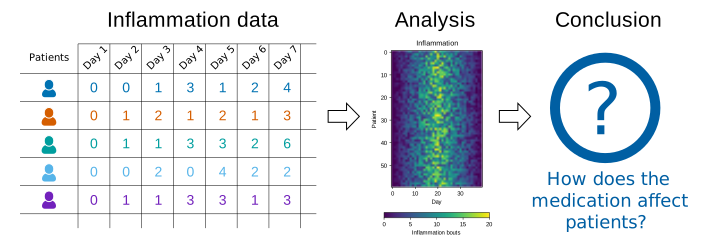
Data Format
The data sets are stored in comma-separated values (CSV) format:
- each row holds information for a single patient,
- columns represent successive days.
The first three rows of our first file look like this:
0,0,1,3,1,2,4,7,8,3,3,3,10,5,7,4,7,7,12,18,6,13,11,11,7,7,4,6,8,8,4,4,5,7,3,4,2,3,0,0
0,1,2,1,2,1,3,2,2,6,10,11,5,9,4,4,7,16,8,6,18,4,12,5,12,7,11,5,11,3,3,5,4,4,5,5,1,1,0,1
0,1,1,3,3,2,6,2,5,9,5,7,4,5,4,15,5,11,9,10,19,14,12,17,7,12,11,7,4,2,10,5,4,2,2,3,2,2,1,1
Each number represents the number of inflammation bouts that a particular patient experienced on a given day.
For example, value “6” at row 3 column 7 of the data set above means that the third patient was experiencing inflammation six times on the seventh day of the clinical study.
In order to analyze this data and report to our colleagues, we’ll have to learn a little bit about programming.
Prerequisites
You need to understand the concepts of files and directories and how to start a Python interpreter before tackling this lesson. This lesson sometimes references Jupyter Notebook although you can use any Python interpreter mentioned in the Setup.
The commands in this lesson pertain to Python 3.
Getting Started
You can click on the following button to open an interactive Python programming environment called Jupyter
in your browser.

Alternatively (assuming you have some time on your hand), follow the directions on the “Setup” page to download data and install a Python interpreter on your computer.